


|
|
|
by Ray C. Freeman III, LEGO CAD designer
Other Topics:
Technical Background
Creating
Your Own Animations
Using LEGO CAD with
Other Software
Most LEGO CAD elements stick together pretty easily. Sometimes however, certain combinations can be particularly troublesome. Fortunately, a simple technique can make it easy to get an axle through the center hole of a forty tooth gear, or place a brick up under a beam without the baseplate sucking it down.
The secret lies in the fact that when you Move an element (or a number of selected elements, for that matter), you can pick it up by an individual connector, and place that connector where you want it accurately.
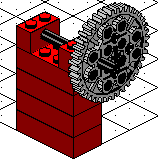 When
you first place an element, all connectors are equally active, making it
sometimes hard to guess which connector is going to actually stick first.
There are so many holes in a forty tooth gear that trying to get one onto
an axle through the center hole is a little like Russian Roulette.
When
you first place an element, all connectors are equally active, making it
sometimes hard to guess which connector is going to actually stick first.
There are so many holes in a forty tooth gear that trying to get one onto
an axle through the center hole is a little like Russian Roulette.
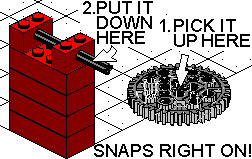 However,
if you place that same gear onto the floor, then select it and Move it
onto the axle, picking it up by the center hole, it will jump right on.
Getting a brick under a beam is easy if you first place it on the floor,
then pick it up by a top stud and stick it up under the beam.
However,
if you place that same gear onto the floor, then select it and Move it
onto the axle, picking it up by the center hole, it will jump right on.
Getting a brick under a beam is easy if you first place it on the floor,
then pick it up by a top stud and stick it up under the beam.
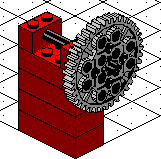 Any
time you are having trouble getting a part to stick where you want it, try
this method. Even though the connectors are invisible, if you think of
picking the element up by the part that you want to stick to the other
part, it usually works. Remember, you have to Move the element to do this,
it doesn't work this way when you are first placing it.
Any
time you are having trouble getting a part to stick where you want it, try
this method. Even though the connectors are invisible, if you think of
picking the element up by the part that you want to stick to the other
part, it usually works. Remember, you have to Move the element to do this,
it doesn't work this way when you are first placing it.
CyberToys, Inc. | The White House Is Our House | LEGO CAD | The CyberToy | Design Thingy | Home Page
©1998 CyberToys, Inc. · 1932 First Avenue, Suite 928 · Seattle, Washington 98101 · (206) 269-0579 fax: 728-2341
This information may be reprinted so long as authorship is credited to
Ray C. Freeman III, with the CyberToys, Inc. copyright notice attached.